[QUESTIONS] => Array
(
[FIO] => Array
(
[CAPTION] => Введите ваше имя
[IS_HTML_CAPTION] => N
[REQUIRED] => Y
[IS_INPUT_CAPTION_IMAGE] => N
[HTML_CODE] =>
[STRUCTURE] => Array
(
[0] => Array
(
[ID] => 198
[FIELD_ID] => 139
[QUESTION_ID] => 139
[TIMESTAMP_X] => 29.09.2022 18:14:54
[MESSAGE] =>
[VALUE] =>
[FIELD_TYPE] => text
[FIELD_WIDTH] => 0
[FIELD_HEIGHT] => 0
[FIELD_PARAM] => class="form-control"
[C_SORT] => 100
[ACTIVE] => Y
)
)
[VALUE] =>
)
[CITY] => Array
(
[CAPTION] => Город
[IS_HTML_CAPTION] => N
[REQUIRED] => Y
[IS_INPUT_CAPTION_IMAGE] => N
[HTML_CODE] =>
[STRUCTURE] => Array
(
[0] => Array
(
[ID] => 199
[FIELD_ID] => 140
[QUESTION_ID] => 140
[TIMESTAMP_X] => 29.09.2022 18:14:54
[MESSAGE] =>
[VALUE] =>
[FIELD_TYPE] => text
[FIELD_WIDTH] => 0
[FIELD_HEIGHT] => 0
[FIELD_PARAM] => class="form-control"
[C_SORT] => 100
[ACTIVE] => Y
)
)
[VALUE] =>
)
[COMPANY] => Array
(
[CAPTION] => Компания
[IS_HTML_CAPTION] => N
[REQUIRED] => Y
[IS_INPUT_CAPTION_IMAGE] => N
[HTML_CODE] =>
[STRUCTURE] => Array
(
[0] => Array
(
[ID] => 200
[FIELD_ID] => 141
[QUESTION_ID] => 141
[TIMESTAMP_X] => 29.09.2022 18:14:54
[MESSAGE] =>
[VALUE] =>
[FIELD_TYPE] => text
[FIELD_WIDTH] => 0
[FIELD_HEIGHT] => 0
[FIELD_PARAM] => class="form-control"
[C_SORT] => 100
[ACTIVE] => Y
)
)
[VALUE] =>
)
[PHONE] => Array
(
[CAPTION] => Телефон
[IS_HTML_CAPTION] => N
[REQUIRED] => Y
[IS_INPUT_CAPTION_IMAGE] => N
[HTML_CODE] =>
[STRUCTURE] => Array
(
[0] => Array
(
[ID] => 201
[FIELD_ID] => 142
[QUESTION_ID] => 142
[TIMESTAMP_X] => 29.09.2022 18:14:54
[MESSAGE] =>
[VALUE] =>
[FIELD_TYPE] => text
[FIELD_WIDTH] => 0
[FIELD_HEIGHT] => 0
[FIELD_PARAM] => class="form-control"
[C_SORT] => 100
[ACTIVE] => Y
)
)
[VALUE] =>
)
[EMAIL] => Array
(
[CAPTION] => E-mail
[IS_HTML_CAPTION] => N
[REQUIRED] => Y
[IS_INPUT_CAPTION_IMAGE] => N
[HTML_CODE] =>
[STRUCTURE] => Array
(
[0] => Array
(
[ID] => 202
[FIELD_ID] => 143
[QUESTION_ID] => 143
[TIMESTAMP_X] => 02.04.2025 11:15:18
[MESSAGE] =>
[VALUE] =>
[FIELD_TYPE] => text
[FIELD_WIDTH] => 0
[FIELD_HEIGHT] => 0
[FIELD_PARAM] => class="form-control"
[C_SORT] => 100
[ACTIVE] => Y
)
)
[VALUE] =>
)
[THEME_EMAIL] => Array
(
[CAPTION] => Тема обращения
[IS_HTML_CAPTION] => N
[REQUIRED] => Y
[IS_INPUT_CAPTION_IMAGE] => N
[HTML_CODE] =>
[STRUCTURE] => Array
(
[0] => Array
(
[ID] => 205
[FIELD_ID] => 146
[QUESTION_ID] => 146
[TIMESTAMP_X] => 10.07.2023 16:31:28
[MESSAGE] => Входящая корреспонденция
[VALUE] => office@qtech.ru
[FIELD_TYPE] => dropdown
[FIELD_WIDTH] => 0
[FIELD_HEIGHT] => 0
[FIELD_PARAM] => class="form-control"
[C_SORT] => 100
[ACTIVE] => Y
)
[1] => Array
(
[ID] => 206
[FIELD_ID] => 146
[QUESTION_ID] => 146
[TIMESTAMP_X] => 10.07.2023 16:31:28
[MESSAGE] => Подбор оборудования
[VALUE] => distr@qtech.ru
[FIELD_TYPE] => dropdown
[FIELD_WIDTH] => 0
[FIELD_HEIGHT] => 0
[FIELD_PARAM] => class="form-control"
[C_SORT] => 200
[ACTIVE] => Y
)
[2] => Array
(
[ID] => 207
[FIELD_ID] => 146
[QUESTION_ID] => 146
[TIMESTAMP_X] => 10.07.2023 16:31:28
[MESSAGE] => Покупка оборудования
[VALUE] => distr@qtech.ru
[FIELD_TYPE] => dropdown
[FIELD_WIDTH] => 0
[FIELD_HEIGHT] => 0
[FIELD_PARAM] => class="form-control"
[C_SORT] => 300
[ACTIVE] => Y
)
[3] => Array
(
[ID] => 208
[FIELD_ID] => 146
[QUESTION_ID] => 146
[TIMESTAMP_X] => 10.07.2023 16:31:28
[MESSAGE] => Взять оборудование в тест
[VALUE] => distr@qtech.ru
[FIELD_TYPE] => dropdown
[FIELD_WIDTH] => 0
[FIELD_HEIGHT] => 0
[FIELD_PARAM] => class="form-control"
[C_SORT] => 400
[ACTIVE] => Y
)
[4] => Array
(
[ID] => 209
[FIELD_ID] => 146
[QUESTION_ID] => 146
[TIMESTAMP_X] => 10.07.2023 16:31:28
[MESSAGE] => Техническая поддержка
[VALUE] => qtech.intradesk.ru
[FIELD_TYPE] => dropdown
[FIELD_WIDTH] => 0
[FIELD_HEIGHT] => 0
[FIELD_PARAM] => class="form-control"
[C_SORT] => 500
[ACTIVE] => Y
)
[5] => Array
(
[ID] => 210
[FIELD_ID] => 146
[QUESTION_ID] => 146
[TIMESTAMP_X] => 10.07.2023 16:31:28
[MESSAGE] => Гарантийное обслуживание
[VALUE] => guarantee@qtech.ru
[FIELD_TYPE] => dropdown
[FIELD_WIDTH] => 0
[FIELD_HEIGHT] => 0
[FIELD_PARAM] => class="form-control"
[C_SORT] => 600
[ACTIVE] => Y
)
)
[VALUE] =>
)
[THEME_EMAIL_HIDDEN] => Array
(
[CAPTION] =>
[IS_HTML_CAPTION] => N
[REQUIRED] => N
[IS_INPUT_CAPTION_IMAGE] => N
[HTML_CODE] =>
[STRUCTURE] => Array
(
[0] => Array
(
[ID] => 211
[FIELD_ID] => 147
[QUESTION_ID] => 147
[TIMESTAMP_X] => 29.09.2022 19:39:49
[MESSAGE] =>
[VALUE] =>
[FIELD_TYPE] => hidden
[FIELD_WIDTH] => 0
[FIELD_HEIGHT] => 0
[FIELD_PARAM] =>
[C_SORT] => 100
[ACTIVE] => Y
)
)
[VALUE] =>
)
[TEXT] => Array
(
[CAPTION] => Ваше сообщение...
[IS_HTML_CAPTION] => N
[REQUIRED] => N
[IS_INPUT_CAPTION_IMAGE] => N
[HTML_CODE] =>
[STRUCTURE] => Array
(
[0] => Array
(
[ID] => 203
[FIELD_ID] => 144
[QUESTION_ID] => 144
[TIMESTAMP_X] => 29.09.2022 18:14:54
[MESSAGE] =>
[VALUE] =>
[FIELD_TYPE] => textarea
[FIELD_WIDTH] => 0
[FIELD_HEIGHT] => 0
[FIELD_PARAM] => class="form-control"
[C_SORT] => 100
[ACTIVE] => Y
)
)
[VALUE] =>
)
[check] => Array
(
[CAPTION] =>
[IS_HTML_CAPTION] => N
[REQUIRED] => N
[IS_INPUT_CAPTION_IMAGE] => N
[HTML_CODE] =>
[STRUCTURE] => Array
(
[0] => Array
(
[ID] => 204
[FIELD_ID] => 145
[QUESTION_ID] => 145
[TIMESTAMP_X] => 29.09.2022 18:14:54
[MESSAGE] =>
[VALUE] =>
[FIELD_TYPE] => text
[FIELD_WIDTH] => 0
[FIELD_HEIGHT] => 0
[FIELD_PARAM] =>
[C_SORT] => 100
[ACTIVE] => Y
)
)
[VALUE] =>
)
[FILES] => Array
(
[CAPTION] =>
[IS_HTML_CAPTION] => N
[REQUIRED] => N
[IS_INPUT_CAPTION_IMAGE] => N
[HTML_CODE] =>
[STRUCTURE] => Array
(
[0] => Array
(
[ID] => 232
[FIELD_ID] => 158
[QUESTION_ID] => 158
[TIMESTAMP_X] => 10.11.2022 15:06:06
[MESSAGE] =>
[VALUE] =>
[FIELD_TYPE] => text
[FIELD_WIDTH] => 0
[FIELD_HEIGHT] => 0
[FIELD_PARAM] =>
[C_SORT] => 100
[ACTIVE] => Y
)
)
[VALUE] =>
)
[INN] => Array
(
[CAPTION] => ИНН
[IS_HTML_CAPTION] => N
[REQUIRED] => N
[IS_INPUT_CAPTION_IMAGE] => N
[HTML_CODE] =>
[STRUCTURE] => Array
(
[0] => Array
(
[ID] => 238
[FIELD_ID] => 164
[QUESTION_ID] => 164
[TIMESTAMP_X] => 24.08.2023 09:01:39
[MESSAGE] =>
[VALUE] =>
[FIELD_TYPE] => text
[FIELD_WIDTH] => 0
[FIELD_HEIGHT] => 0
[FIELD_PARAM] => class="form-control"
[C_SORT] => 100
[ACTIVE] => Y
)
)
[VALUE] =>
)
[MANAGER] => Array
(
[CAPTION] => Ваш менеджер QTECH
[IS_HTML_CAPTION] => N
[REQUIRED] => N
[IS_INPUT_CAPTION_IMAGE] => N
[HTML_CODE] =>
[STRUCTURE] => Array
(
[0] => Array
(
[ID] => 239
[FIELD_ID] => 165
[QUESTION_ID] => 165
[TIMESTAMP_X] => 24.08.2023 09:01:59
[MESSAGE] =>
[VALUE] =>
[FIELD_TYPE] => text
[FIELD_WIDTH] => 0
[FIELD_HEIGHT] => 0
[FIELD_PARAM] => class="form-control"
[C_SORT] => 100
[ACTIVE] => Y
)
)
[VALUE] =>
)
[COOP_TYPE] => Array
(
[CAPTION] => Тип сотрудничества*
[IS_HTML_CAPTION] => N
[REQUIRED] => N
[IS_INPUT_CAPTION_IMAGE] => N
[HTML_CODE] =>
[STRUCTURE] => Array
(
[0] => Array
(
[ID] => 240
[FIELD_ID] => 166
[QUESTION_ID] => 166
[TIMESTAMP_X] => 24.08.2023 09:02:46
[MESSAGE] => Конечный заказчик
[VALUE] =>
[FIELD_TYPE] => dropdown
[FIELD_WIDTH] => 0
[FIELD_HEIGHT] => 0
[FIELD_PARAM] => class="form-control"
[C_SORT] => 100
[ACTIVE] => Y
)
[1] => Array
(
[ID] => 241
[FIELD_ID] => 166
[QUESTION_ID] => 166
[TIMESTAMP_X] => 24.08.2023 09:02:46
[MESSAGE] => Партнер/Дистрибьютор
[VALUE] =>
[FIELD_TYPE] => dropdown
[FIELD_WIDTH] => 0
[FIELD_HEIGHT] => 0
[FIELD_PARAM] => class="form-control"
[C_SORT] => 200
[ACTIVE] => Y
)
)
[VALUE] =>
)
[ADDRESS] => Array
(
[CAPTION] => Адрес объекта установки оборудования
[IS_HTML_CAPTION] => N
[REQUIRED] => N
[IS_INPUT_CAPTION_IMAGE] => N
[HTML_CODE] =>
[STRUCTURE] => Array
(
[0] => Array
(
[ID] => 242
[FIELD_ID] => 167
[QUESTION_ID] => 167
[TIMESTAMP_X] => 24.08.2023 09:03:21
[MESSAGE] =>
[VALUE] =>
[FIELD_TYPE] => text
[FIELD_WIDTH] => 0
[FIELD_HEIGHT] => 0
[FIELD_PARAM] => class="form-control"
[C_SORT] => 100
[ACTIVE] => Y
)
)
[VALUE] =>
)
[NAME_OWNER] => Array
(
[CAPTION] => Наименование заказчика*
[IS_HTML_CAPTION] => N
[REQUIRED] => N
[IS_INPUT_CAPTION_IMAGE] => N
[HTML_CODE] =>
[STRUCTURE] => Array
(
[0] => Array
(
[ID] => 243
[FIELD_ID] => 168
[QUESTION_ID] => 168
[TIMESTAMP_X] => 24.08.2023 09:03:50
[MESSAGE] =>
[VALUE] =>
[FIELD_TYPE] => text
[FIELD_WIDTH] => 0
[FIELD_HEIGHT] => 0
[FIELD_PARAM] => class="form-control"
[C_SORT] => 100
[ACTIVE] => Y
)
)
[VALUE] =>
)
[INN_OWNER] => Array
(
[CAPTION] => ИНН заказчика
[IS_HTML_CAPTION] => N
[REQUIRED] => N
[IS_INPUT_CAPTION_IMAGE] => N
[HTML_CODE] =>
[STRUCTURE] => Array
(
[0] => Array
(
[ID] => 244
[FIELD_ID] => 169
[QUESTION_ID] => 169
[TIMESTAMP_X] => 24.08.2023 09:04:16
[MESSAGE] =>
[VALUE] =>
[FIELD_TYPE] => text
[FIELD_WIDTH] => 0
[FIELD_HEIGHT] => 0
[FIELD_PARAM] => class="form-control"
[C_SORT] => 100
[ACTIVE] => Y
)
)
[VALUE] =>
)
[OWNER_CITY] => Array
(
[CAPTION] => Город заказчика*
[IS_HTML_CAPTION] => N
[REQUIRED] => N
[IS_INPUT_CAPTION_IMAGE] => N
[HTML_CODE] =>
[STRUCTURE] => Array
(
[0] => Array
(
[ID] => 245
[FIELD_ID] => 170
[QUESTION_ID] => 170
[TIMESTAMP_X] => 24.08.2023 09:04:39
[MESSAGE] =>
[VALUE] =>
[FIELD_TYPE] => text
[FIELD_WIDTH] => 0
[FIELD_HEIGHT] => 0
[FIELD_PARAM] => class="form-control"
[C_SORT] => 100
[ACTIVE] => Y
)
)
[VALUE] =>
)
[TEMPLATE] => Array
(
[CAPTION] =>
[IS_HTML_CAPTION] => N
[REQUIRED] => N
[IS_INPUT_CAPTION_IMAGE] => N
[HTML_CODE] =>
[STRUCTURE] => Array
(
[0] => Array
(
[ID] => 246
[FIELD_ID] => 171
[QUESTION_ID] => 171
[TIMESTAMP_X] => 24.08.2023 09:05:04
[MESSAGE] =>
[VALUE] =>
[FIELD_TYPE] => text
[FIELD_WIDTH] => 0
[FIELD_HEIGHT] => 0
[FIELD_PARAM] =>
[C_SORT] => 100
[ACTIVE] => Y
)
)
[VALUE] =>
)
)
[SUBMIT_BUTTON] =>
[APPLY_BUTTON] =>
[RESET_BUTTON] =>
[REQUIRED_STAR] => *
[CAPTCHA_IMAGE] =>  [CAPTCHA_FIELD] =>
[CAPTCHA] =>
[CAPTCHA_FIELD] =>
[CAPTCHA] =>
)
)
Обновление ПО на стеке коммутаторов QSW-4530 с использованием команды copy toall
ВАЖНО!
Мы не рекомендуем обновлять BOOT этим методом, это может привести к полной неработоспособности устройства.Данная статья актуальна для коммутаторов с версией 8.2.3.300 и выше.
Перед установкой при помощи FTP, SFTP или TFTP потребуется создать ip связанность между сервером и стеком.
Для этого создадим VLAN 10 на коммутаторе:
 QSW-4530-54TX#config
 QSW-4530-54TX(config)#vlan 10
 QSW-4530-54TX(config-vlan10)#exit
 QSW-4530-54TX(config)#interface vlan 10
 QSW-4530-54TX(config-if-vlan10)#ip address 10.1.2.2 255.255.255.0
 QSW-4530-54TX(config-if-vlan10)#exit
 QSW-4530-54TX(config)#interface ethernet 1/0/15
 QSW-4530-54TX(config-if-ethernet1/0/15)#switchport access vlan 10
Настроим IP для ПК:
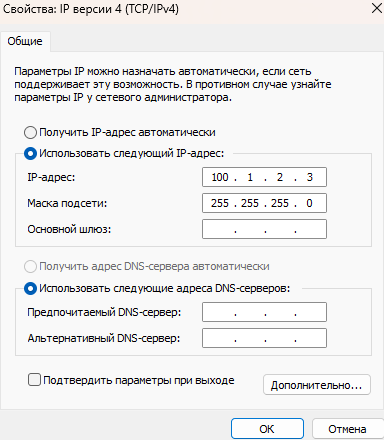
Проверим связанность командой ping из консоли коммутатора или сервера:
       QSW-4530-54TX#ping 10.1.2.3
       Type ^c to abort.
       Sending 5 56-byte ICMP Echos to 10.1.2.3, timeout is 2 seconds.
       !!!!!
       Success rate is 100 percent (5/5), round-trip min/avg/max = 5/5/5 ms
1. Установка с помощью TFTP
В данном примере будем использовать ПК в качестве TFTP сервера, для этого предварительно установим утилиту Tftpd64:
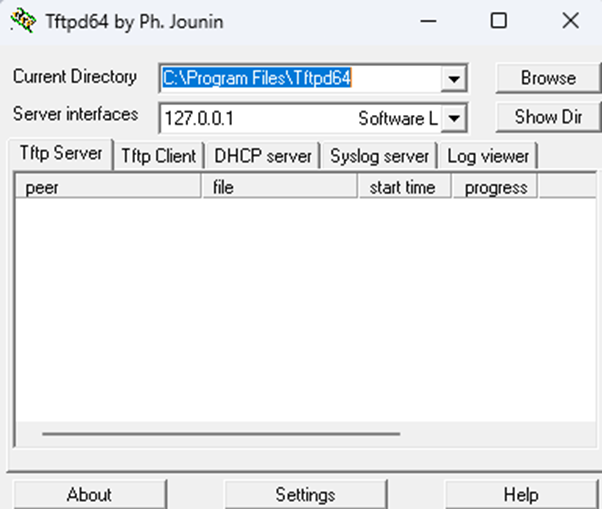
Тут потребуется выставить нужный ip и выбрать папку с файлом прошивки.
Далее используем команду на коммутаторе:
copy toall tftp://<serverIP>/<NameFileOnServer>.img NameOnSwitch.img
QSW-4530-54TX#copy toall tftp://10.1.2.3/QSW-4530-X_QTECH_LLC_8.2.3.300_nos.img 8.2.3.300_nos.img---Search file result-------
01: file not found
02: file not found
03: file not found
----------------------------
Begin to receive file, please wait
TFTP server accept 1468 bytes segsize
Get Img file size success, Img file size is:19778476(bytes).
100%
---File transfer complete--- 97 sec
01: file not found 19778476(bytes)
02: file not found 19778476(bytes)
03: file not found 19778476(bytes)
----------------------------
Wait other units...
---Summary------------------ 171 sec
01: file not found 19778476(bytes) DONE
02: file not found 19778476(bytes) DONE
03: file not found 19778476(bytes) DONE
----------------------------
Begin to write local file, please wait...
Write ok.
2. Установка с помощью FTP
copy toall ftp://<username>:<password>@<serverIP>/<FileNameOnServer> nos.img
QSW-4530-54TX#copy toall ftp://admin:admin@ 10.1.2.3/QSW-4530-X_QTECH_LLC_8.2.3.300_nos.img 8.2.3.300_nos.img---Search file result-------
01: file not found
02: file not found
03: file not found
----------------------------
100%
---File transfer complete--- 80 sec
01: file not found 19784893(bytes)
02: file not found 19784893(bytes)
03: file not found 19784893(bytes)
----------------------------
Wait other units...
---Summary------------------ 154 sec
01: file not found 19784893(bytes) DONE
02: file not found 19784893(bytes) DONE
03: file not found 19784893(bytes) DONE
----------------------------
220 (vsFTPd 3.0.5)
331 Please specify the password.
230 Login successful.
200 Switching to Binary mode.
200 PORT command successful. Consider using PASV.
150 Opening BINARY mode data connection for LLC_8.2.3.285_nos.img (19784893 bytes).
Get Img file size success, Img file size is:19784893(bytes).
Recv total 19784893 bytes
226 Transfer complete.
Begin to write local file, please wait...
Write ok.
3. Установка с помощью SFTP
copy toall sftp:// <username>:<password>@<serverIP>/<FileNameOnServer> nos.img
QSW-4530-54TX# copy toall sftp://admin:admin@ 10.1.2.3/QSW-4530-X_QTECH_LLC_8.2.3.300_nos.img 8.2.3.300_nos.imgWe are talking to an OpenSSH client version: 9.6 (90600)
---Search file result-------
01: file not found
02: file not found
03: file not found
----------------------------
SFTP server version 3
100
---File transfer complete--- 166 sec
01: file not found 19784893(bytes)
02: file not found 19784893(bytes)
03: file not found 19784893(bytes)
---------------------------
Writing
Wait other units...
---Summary------------------ 240 sec
01: file not found 19784893(bytes) DONE
02: file not found 19784893(bytes) DONE
03: file not found 19784893(bytes) DONE
----------------------------
4. Установка с помощью USB
copy toall usb0:/<NameFileOnFlashDrive> nos.img
QSW-4530-54TX#copy toall usb0:/QSW-4530-X_QTECH_LLC_8.2.3.300_nos.img 8.2.3.300_nos.img---Search file result-------
01: file not found
02: file not found
03: file not found
----------------------------
Reading file done
100%
---File transfer complete--- 95 sec
01: file not found 19778476(bytes)
02: file not found 19778476(bytes)
03: file not found 19778476(bytes)
----------------------------
Wait other units...
---Summary------------------ 169 sec
01: file not found 19778476(bytes) DONE
02: file not found 19778476(bytes) DONE
03: file not found 19778476(bytes) DONE
----------------------------
Begin to write local file, please wait...
Write ok.
По завершению установки любым из вышеописанных способов, нужно выставить приоритет прошивки, с которой будет выполняться следующая загрузка на всех юнитах:
QSW-4530-54TX-POE#boot img 8.2.3.300_nos.img primaryflash:/8.2.3.300_nos.img will be used as the primary img file on member 1, slot 1 at the next time!
QSW-4530-54TX-POE#boot img slot-2#8.2.3.300_nos.img primary
flash:/8.2.3.300_nos.img will be used as the primary img file on member 2, slot 1 at the next time!
После потребуется выполнить перезагрузку:
QSW-4530-54TX-POE# reload
Смотрите так же
Важно!
Данная статья актуальна для устройств с версией ПО 8.2.3.333(QSW-4530/4900) и выше и 8.2.1.245(QSW-3750/4610/3420) и выше.
Перед обновление ознакомьтесь со статьёй "Переход на новую версию SSH"
Для настройки функционала подключения к коммутатору QSW-4530 с использование публич...
Разберем настройку TACACS+ на примере следующей схемы:
Пример конфигурации:
SWITCH#config
SWITCH(config)# tacacs-server authentication host 172.16.1.3 key 0 test primary
SWITCH(config)# authentication line vty login tacacsSWITCH(config)# tacacs-server timeout 30 Разберем команды п...
На коммутаторе QSW-4530 существует несколько вариантов назначения динамического vlan в данной статье рассмотрим mac-vlan и protocol-vlan.
MAC-VLAN
MAC-VLAN - используется для назначения номера Vlan в зависимости от мак-адреса клиента.
В качестве примера выполним наст...
К списку